Room scan · use cases

Three things a room scan is good for

Walk around a room with a phone. SceneView keeps what the camera understood — the floor, the walls, the path you took — and can play it back. Here is what that gives you today: a picture from the demo app, what it does and does not do, and the smallest code behind it.

Remember how the room looked

A tenant gets the keys to an empty flat and wants to keep how each room looked that day, to look at again when they move out.
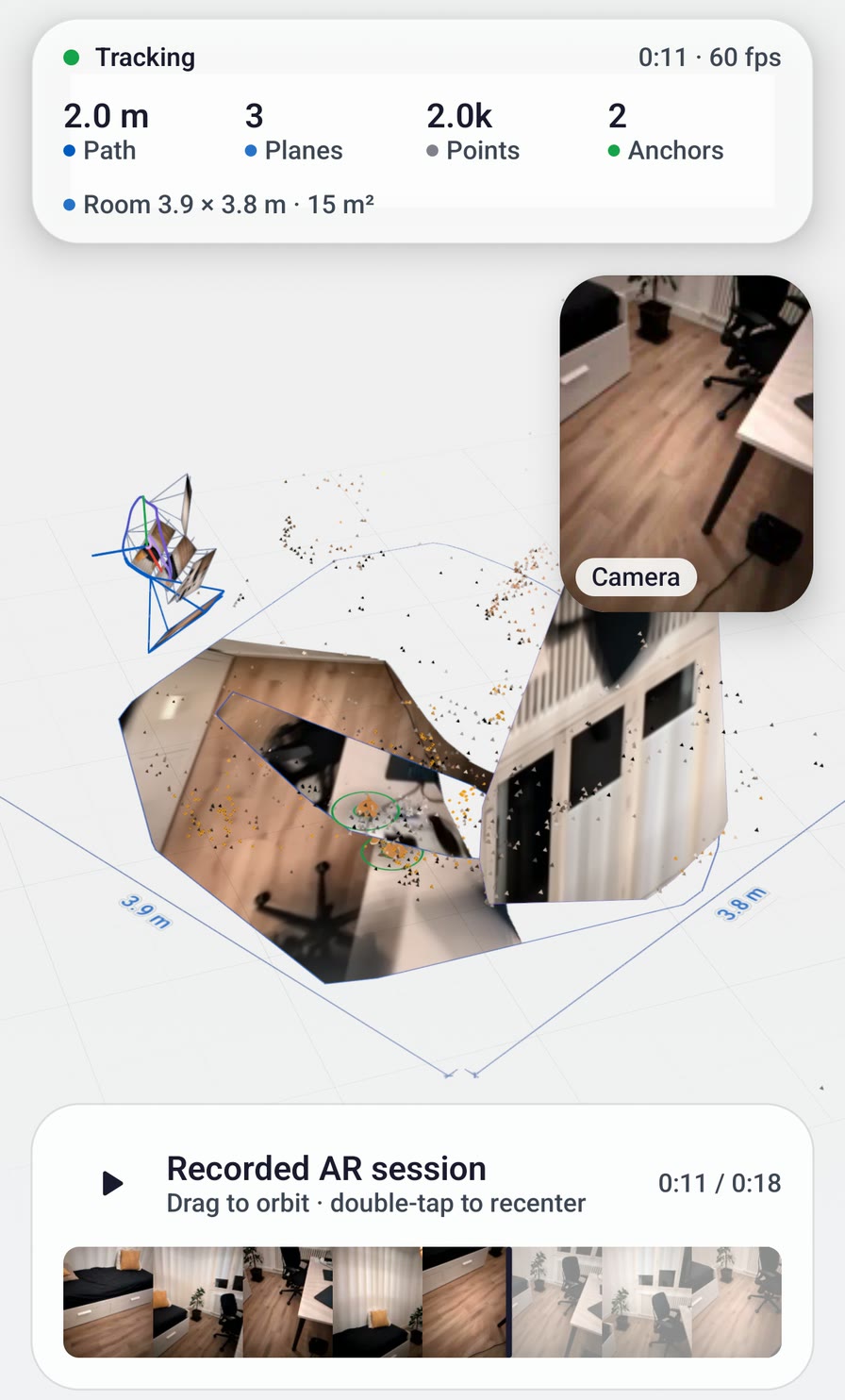
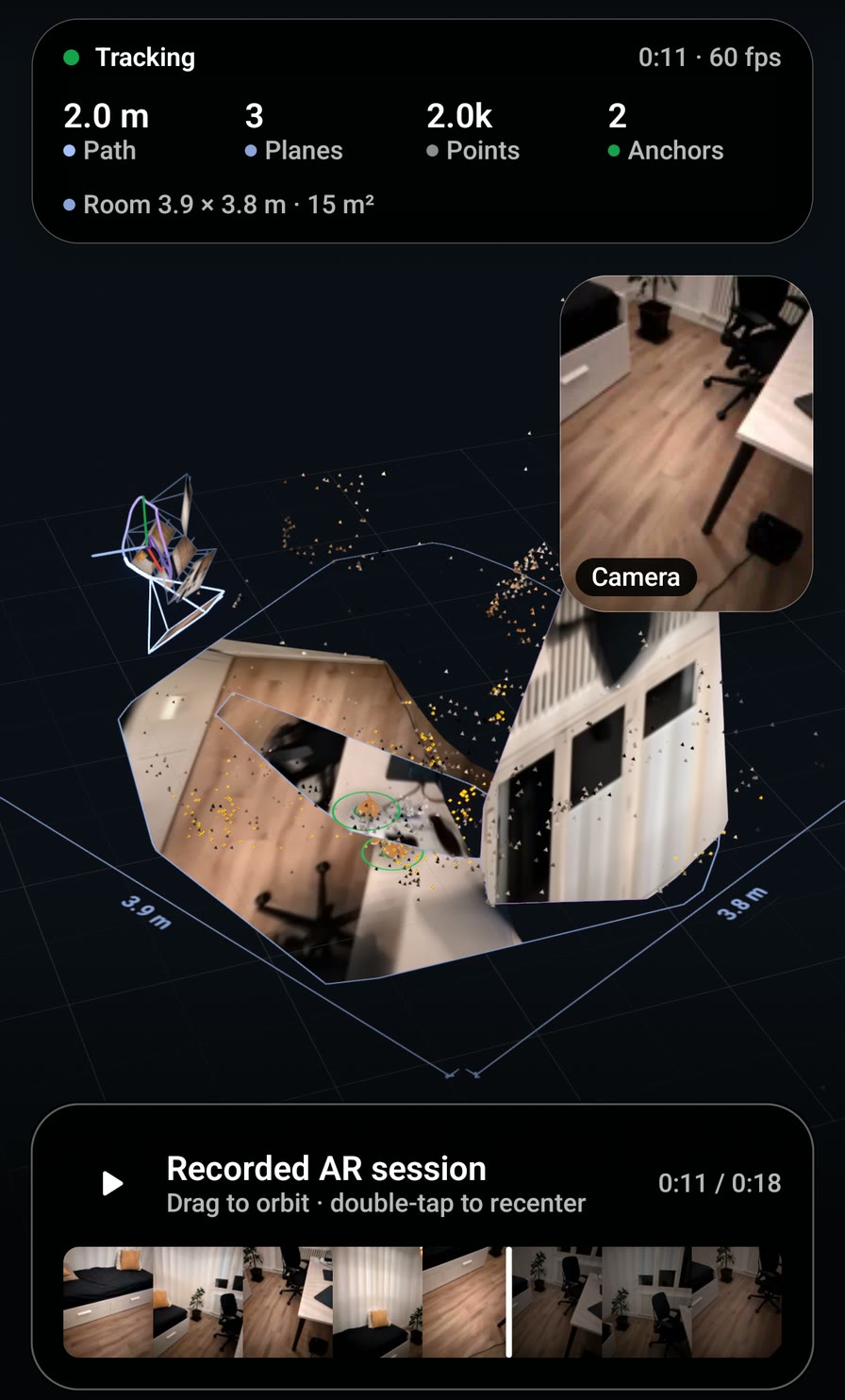
The SceneView Android demo replaying a scanned room: the floor rebuilt in 3D with the walked path, the camera picture in a corner, and a timeline of the recording underneath. The SceneView Android demo replaying a scanned room: the floor rebuilt in 3D with the walked path, the camera picture in a corner, and a timeline of the recording underneath.
The Android demo replaying the recording that ships with it: a real room, walked with a phone. Drag to look around, slide the timeline to go back to any moment.
Works today

What you get

  • In the demo app: scan a room, stop, and the replay opens — the room rebuilt in 3D, the path you walked, and the camera picture from each moment. Sessions stay on the phone and can be opened again later.
  • In your own app, on Android: one call records the walk to a file, one parameter plays that file back as if the phone were standing in the room again.

What it does not do

  • The SDK plays the recording back through the camera view. The 3D room you can turn around in the picture is demo code you can copy, not one SDK call.
  • On iPhone the SDK records a video of the walk and nothing more. The iPhone demo has its own scan and 3D replay, also as sample code.
  • The file the Android code records plays back on Android phones, not on an iPhone.

The smallest version: a Scan button that starts recording, a Replay button that stops and plays the file back.

Kotlin (Jetpack Compose)
import io.github.sceneview.ar.ARSceneView
import io.github.sceneview.ar.recording.rememberARRecorder
import java.io.File

@Composable
fun RoomMemory(folder: File) {
    val recorder = rememberARRecorder()
    var replay by remember { mutableStateOf<File?>(null) } // null = the live camera

    Box(Modifier.fillMaxSize()) {
        // A session reads its source once: key() rebuilds it when the file changes.
        key(replay) {
            ARSceneView(
                modifier = Modifier.fillMaxSize(),
                playbackDataset = replay,
                onSessionUpdated = { session, _ -> recorder.recordFrame(session) }
            )
        }
        Row(Modifier.align(Alignment.BottomCenter)) {
            Button(onClick = { recorder.start(File(folder, "living-room.mp4")) }) { Text("Scan") }
            Button(onClick = { replay = recorder.stop() }) { Text("Replay") }
        }
    }
}

SwiftUI: record a video of the walk. There is no replay on iPhone in the SDK.
Swift (SwiftUI)
import SwiftUI
import SceneViewSwift

struct RoomMemory: View {
    @StateObject private var recorder = ARRecorder()
    @State private var video: URL?

    var body: some View {
        ARSceneView(planeDetection: .horizontal)
            .overlay(alignment: .bottom) {
                VStack {
                    Button(recorder.isRecording ? "Stop" : "Scan") {
                        Task {
                            if recorder.isRecording {
                                video = try? await recorder.stopRecording()
                            } else {
                                try? await recorder.startRecording()
                            }
                        }
                    }
                    // A video of the walk, to keep or to send.
                    if let video { ShareLink("Keep the video", item: video) }
                }
            }
    }
}

Sample source ARRerunDemo.kt RerunScan.kt RerunReplayScene.kt iOS demo: Rerun/
How much floor does this room cover?

A floor fitter visiting a customer wants a first figure for the quote before getting the tape measure out.

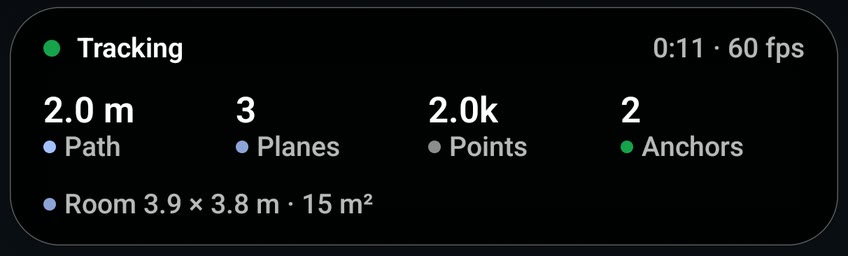
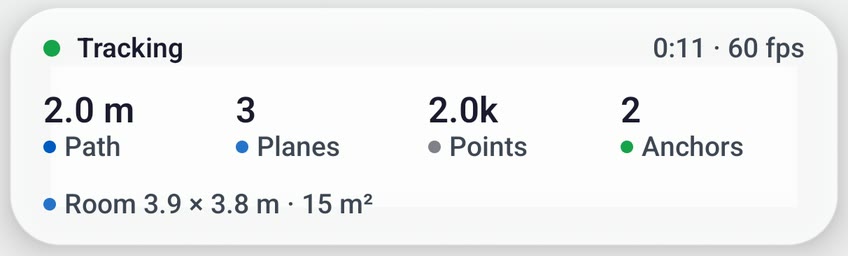
The demo's summary card: path 2.0 m, 3 planes, 2.0k points, 2 anchors, and the line Room 3.9 by 3.8 m, 15 square metres. The demo's summary card: path 2.0 m, 3 planes, 2.0k points, 2 anchors, and the line Room 3.9 by 3.8 m, 15 square metres.
The same replay, top of the screen. The last line is the room: two lengths and the floor they make.
In review, not in the app yet

A room size that holds steady while you are still scanning (#4399), and the room size in the iPhone demo (#4402).

Works today, as an estimate

What you get

  • In the demo app, on Android: the replay reads the room off the scan and shows it as Room 3.9 × 3.8 m · 15 m² — the rectangle that fits the floor, squared to the walls.
  • In your own app: the phone hands you every patch of floor it has found, with its outline in metres. Adding them up is a dozen lines.

What it does not do

  • It is an estimate, never a surveyed figure. It grows as you walk, and floor hidden under a bed or a sofa is not counted until the camera has seen it.
  • The demo's rectangle reads right on the bundled room and too large on big or open spaces: a terrace of about 11.8 × 5.8 m read 19 × 8.6 m (#4328).
  • The rectangle is demo code to copy. The code below uses the SDK alone and counts the floor the camera has seen, which is a different, smaller figure.

The smallest version: add up the floor the phone has found so far and show it in square metres.

Kotlin (Jetpack Compose)
import com.google.ar.core.Plane
import com.google.ar.core.TrackingState
import io.github.sceneview.ar.ARSceneView
import io.github.sceneview.ar.arcore.polygon
import io.github.sceneview.ar.arcore.subsumedBy
import kotlin.math.abs

/** Surface of one detected patch, in m², from its outline (x, z pairs). */
fun Plane.area(): Float {
    val outline = polygon
    val corners = outline.limit() / 2
    var twice = 0f
    for (i in 0 until corners) {
        val j = (i + 1) % corners
        twice += outline[2 * i] * outline[2 * j + 1] - outline[2 * j] * outline[2 * i + 1]
    }
    return abs(twice) / 2f
}

@Composable
fun FloorArea() {
    var squareMetres by remember { mutableFloatStateOf(0f) }

    Box(Modifier.fillMaxSize()) {
        ARSceneView(
            modifier = Modifier.fillMaxSize(),
            onSessionUpdated = { session, _ ->
                val level = session.getAllTrackables(Plane::class.java).filter {
                    it.trackingState == TrackingState.TRACKING && it.subsumedBy == null &&
                        it.type == Plane.Type.HORIZONTAL_UPWARD_FACING
                }
                // The floor is the lowest level surface; a table or a bed sits higher.
                val floorY = level.minOfOrNull { it.centerPose.ty() } ?: 0f
                squareMetres = level.filter { it.centerPose.ty() < floorY + 0.2f }
                    .sumOf { it.area().toDouble() }.toFloat()
            }
        )
        Text("%.1f m² of floor seen".format(squareMetres), Modifier.align(Alignment.BottomCenter))
    }
}
SwiftUI: the same figure from ARKit, which tells the floor apart from tables and seats.
Swift (SwiftUI)
import ARKit
import SwiftUI
import SceneViewSwift

extension ARPlaneAnchor {
    /// Surface of one detected patch, in m², from its outline.
    var area: Float {
        let corners = geometry.boundaryVertices
        var twice: Float = 0
        for i in corners.indices {
            let j = (i + 1) % corners.count
            twice += corners[i].x * corners[j].z - corners[j].x * corners[i].z
        }
        return abs(twice) / 2
    }
}

struct FloorArea: View {
    @State private var squareMetres: Float = 0

    var body: some View {
        ARSceneView(planeDetection: .horizontal)
            .onFrame { frame, _ in
                // ARKit names what each surface is: keep the floor, skip tables and seats.
                let floor = frame.anchors
                    .compactMap { $0 as? ARPlaneAnchor }
                    .filter { $0.classification == .floor }
                    .reduce(Float(0)) { $0 + $1.area }
                Task { @MainActor in squareMetres = floor }
            }
            .overlay(alignment: .bottom) {
                Text(String(format: "%.1f m² of floor seen", squareMetres))
            }
    }
}

Sample source RoomMeasure.kt RerunReplayUi.kt Plane.kt (SDK)

A room outline for a listing

An estate agent wants the shape of the living room, with its two lengths, to put next to the photos.

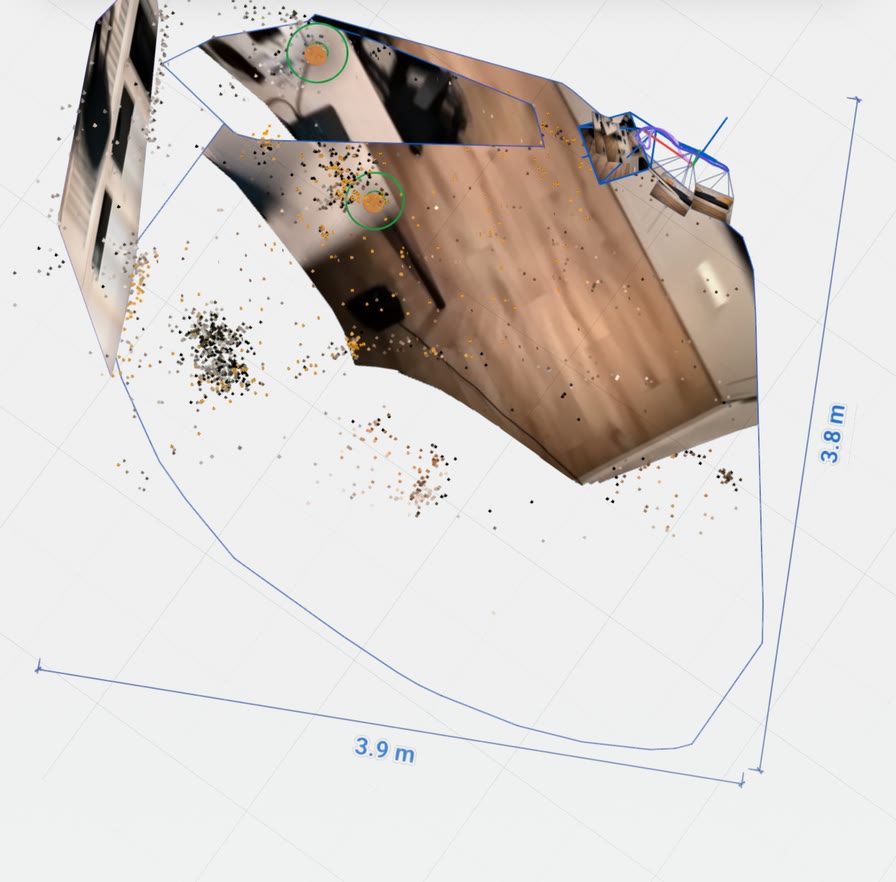
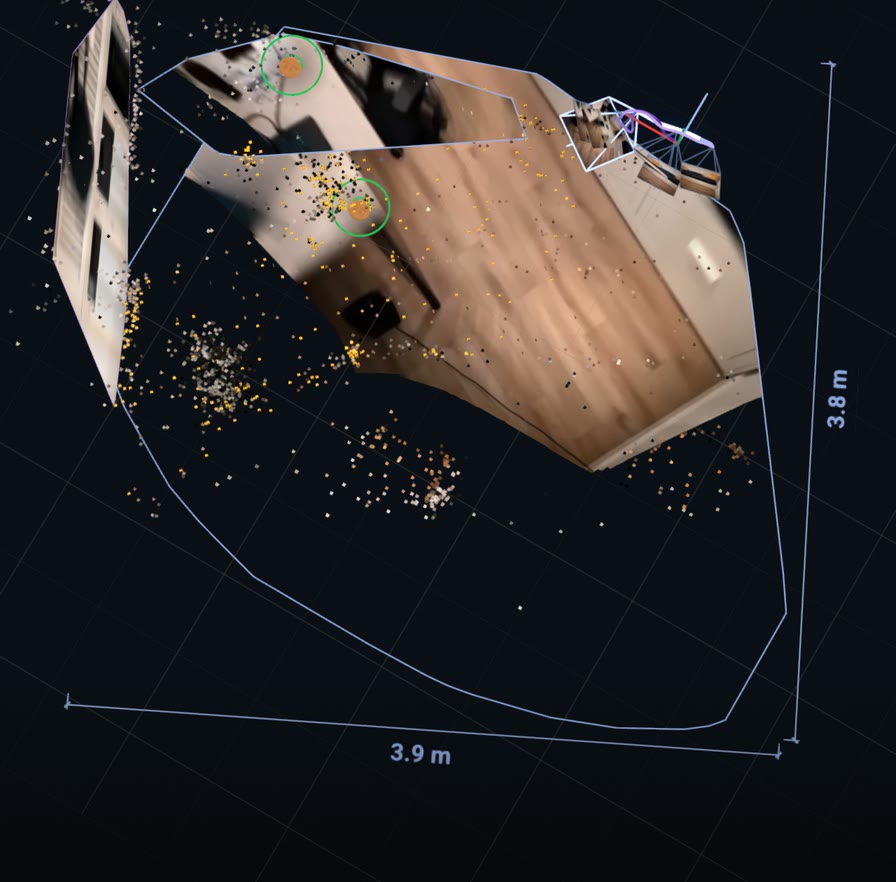
The scanned floor seen from above in the demo's Map view, with its outline drawn around it and two dimension lines reading 3.9 m and 3.8 m. The scanned floor seen from above in the demo's Map view, with its outline drawn around it and two dimension lines reading 3.9 m and 3.8 m.
The same replay in the demo's Map view, the floor seen from above: the thin line is the outline of the floor the scan found, the two labels are its lengths.
On screen today No plan file

What you get

  • In the demo app, on Android: the replay draws the outline of the floor with its two lengths, and a Map button turns the view to look at the room from straight above.
  • In your own app: the corners of the floor, in metres, ready to draw at any size.

What it does not do

  • There is no plan to download. Neither the SDK nor the demo writes a PDF, an image or a drawing file of the outline. Today the way to put it in a listing is a screenshot of the view from above.
  • The demo can share the scan as a 3D file (.glb, .ply, .rrd) for people who work in a 3D tool. That is a model of the room, not a plan.
  • The outline follows what the camera saw: it is ragged where furniture stands against a wall, and it has no doors or windows.
  • The iPhone demo has the view from above, without the two lengths.

The smallest version: take the biggest patch of floor, lay its corners flat, and draw the shape under the camera view.

Kotlin (Jetpack Compose)
import androidx.compose.ui.geometry.Offset
import androidx.compose.ui.graphics.Path
import androidx.compose.ui.graphics.drawscope.Stroke
import com.google.ar.core.Plane
import com.google.ar.core.TrackingState
import io.github.sceneview.ar.ARSceneView
import io.github.sceneview.ar.arcore.polygon

/** The corners of one floor patch on the ground, in metres: x across, y deep. */
fun Plane.outline(): List<Offset> {
    val local = polygon
    return List(local.limit() / 2) { i ->
        val world = centerPose.transformPoint(floatArrayOf(local[2 * i], 0f, local[2 * i + 1]))
        Offset(world[0], world[2])
    }
}

@Composable
fun RoomOutline() {
    var outline by remember { mutableStateOf(emptyList<Offset>()) }
    val ink = MaterialTheme.colorScheme.onSurface

    Column(Modifier.fillMaxSize()) {
        ARSceneView(
            modifier = Modifier.weight(1f),
            onSessionUpdated = { session, _ ->
                // The biggest level surface the phone has found is the floor.
                session.getAllTrackables(Plane::class.java)
                    .filter {
                        it.trackingState == TrackingState.TRACKING &&
                            it.type == Plane.Type.HORIZONTAL_UPWARD_FACING
                    }
                    .maxByOrNull { it.extentX * it.extentZ }
                    ?.let { outline = it.outline() }
            }
        )
        Canvas(Modifier.fillMaxWidth().height(240.dp)) {
            if (outline.size < 3) return@Canvas
            val left = outline.minOf { it.x }
            val top = outline.minOf { it.y }
            val pixelsPerMetre = minOf(
                size.width / (outline.maxOf { it.x } - left),
                size.height / (outline.maxOf { it.y } - top)
            )
            val path = Path()
            outline.forEachIndexed { i, corner ->
                val x = (corner.x - left) * pixelsPerMetre
                val y = (corner.y - top) * pixelsPerMetre
                if (i == 0) path.moveTo(x, y) else path.lineTo(x, y)
            }
            path.close()
            drawPath(path, ink, style = Stroke(width = 2.dp.toPx()))
        }
    }
}

SwiftUI: ARKit gives the same corners, ARPlaneAnchor.geometry.boundaryVertices, inside ARSceneView.onFrame as in the floor example above. There is no ready-made outline or room measure in SceneViewSwift today.

Sample source RoomMeasure.kt (outline and lengths) RerunReplayScene.kt RerunExportFormat.kt

Try it on your phone

The scan and its replay are in the SceneView demo app, under Rerun AR Replay. It comes with a recorded room, so you can look around before scanning your own.

Pictures on this page are crops of one screen, in its 3D view and its Map view: the Android demo replaying the recording bundled with the app, a real room walked with a phone. The Kotlin on this page is the same code as the recipes in llms.txt, which the project's checks compile against the library.